Clean, declutter, and stay organized.
Take control of your space, declutter your life in sections while sorting items and keeping memories forever.
Problem Statement
Cleaning, donating, and discarding are fragmented processes, forcing people to make rushed decisions without a clear, comforting system.
How It Works
Everything you need to take control
Roominate transforms decluttering from an overwhelming chore into a manageable, even satisfying process.
Declutter by Section
Break overwhelming projects into manageable sessions. Choose a room and time, then focus without distractions.
Preserve Precious Memories
Digitally archive items that matter through photos and notes before they go. Keep what's important forever.
Schedule & Remind
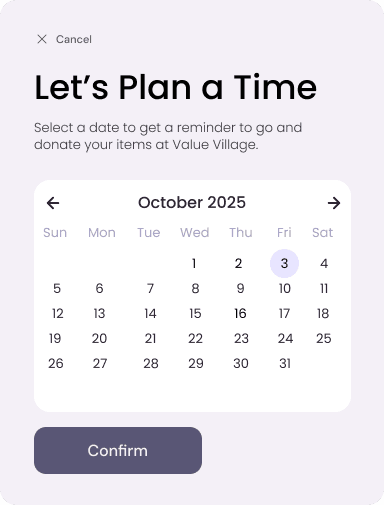
Plan donation and discard dates on a calendar. Get reminders so you actually follow through.
Find Nearby Drop-Off Locations
Discover donation centers and disposal locations nearby. No more wondering where to take things.
Complete Item History
Revisit past sessions anytime. Edit, move, or delete items if you change your mind.
Actually Finish Projects
From decluttering to donation, every step is guided. You'll see it through to the end.
App Features
Let's look at some features within Roominate
Roominate transforms decluttering from an overwhelming chore into a manageable, even satisfying process.
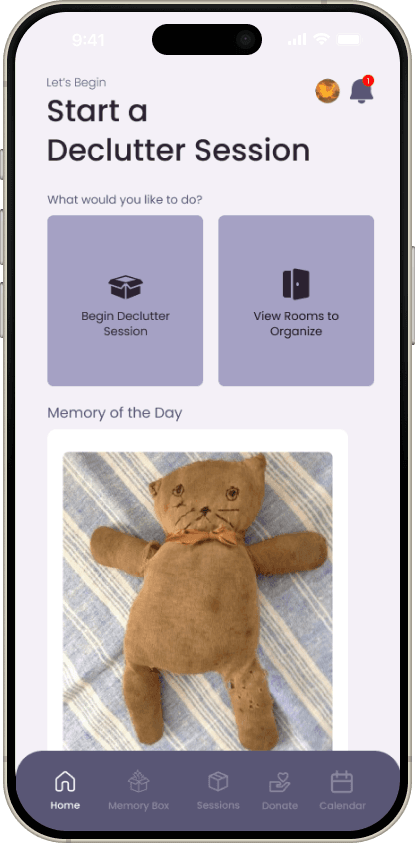
Home Page
Declutter Session
Our multi-feature decluttering session helps users to allocate time to spend organizing their items and clean up their space.
Click to play videos!
Scroll through the workflow
1. Begin a Session
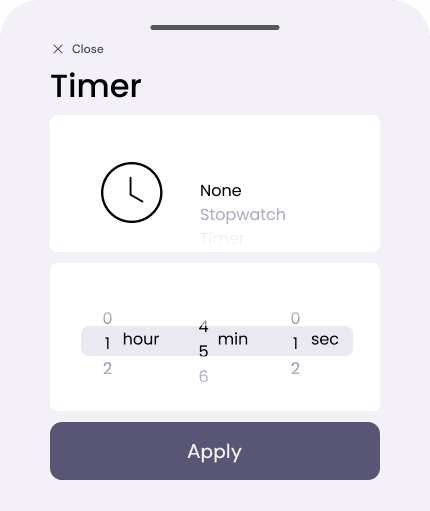
Choose a room and area to start decluttering and set the duration of an optional timer.
2. Session Tutorial
To help reduce cognitive load and stress, an easily accessible information icon provides a simple, step-by-step tutorial on how to complete a successful session.
3. Memory Box
Digitally archive precious items by taking pictures and adding notes.
4. Donation Items
Save pictures and notes of items that will be donated.
5. Discard Items
Save pictures and notes of items that will be discarded.
6. View Session Items
Easily view and manage added items during the session, all in one place.
Memory Box Page
Memory Box Items
Keep a digital archive to store images and notes of the precious items that you’ve decided to donate, discard, or simply preserve on your device.
Click to play videos!
Scroll through the workflow
1. Filtering Items
Items can be filtered by search or item type at the top of the page with clickable toggles for easy access.
2. Viewing Items
A scrollable list shows all viewable added items. Once expanded, there are options to edit or delete.
Session History Page
All Session and Item History
A place to revisit past decluttering sessions and manage the items within each one. View all items, edit existing ones, or delete items you’ve had a change of heart on.
Click to play videos!
Scroll through the workflow
1. History Filter
The dropdown filter can sort through the entire history of the user by either session, donate, discard, or memory items.
2. View Session Items
Once inside a session’s history, items can be found through item type or category.
3. Updating Items
Within an item selection, it can be added or removed from the donation, discard, or memory box categories. The item description can be edited or the item can be completely deleted.
Drop Off Page
Donation and Discard Items
A map that shows all locations an item can be donated or discarded. Filter visible locations by items, view the contact details and hours of operation of each organization, and set a reminder to take action.
Click to play videos!
Scroll through the workflow
1. Select Items
Choose items to donate or discard from the completed decluttering sessions.
2. Find Drop Off Locations
Nearby donation and discard locations are displayed based on the type of items selected.
3. Select Location
Select any donation or discard location and schedule a day to drop off the items.
Calendar Page
View Scheduled Actions
A calendar displaying all scheduled donation and discarding dates with item images. Roominate will send a reminder on the scheduled day, and items can be marked as dropped off or rescheduled if plans change.
Click to play videos!
Scroll through the workflow
1. Date Selection
Select a date to view items scheduled to donate or discard that day.
2. Item Selection
An item can be expanded to also view the scheduled drop off date and location.
3. Rescheduling
Within an item page, the drop off date can be rescheduled to send a reminder on another day.
4. Donated/Discarded
Once dropped off, the item can be marked off and it will disappear from the relevant donation or discard box. Items also within the memory box will not be deleted, and can be accessed in the memory box page.
Ready to reclaim your space?
Start your first decluttering session today
Join people who are finally finishing their decluttering projects, preserving memories, and taking back control of their homes.